
Download ACE ESSAY – AI Essay Enhancer, Free Trial, Secure Academic Writing Tool
Overview of ACE ESSAY
ACE ESSAY is a cloud‑based, AI‑driven writing assistant that focuses on polishing academic essays to make them more personal, engaging, and rigorously structured. Designed for university students, graduate researchers, and professional writers, the platform blends natural‑language processing with scholarly standards to deliver a seamless editing experience. By analysing tone, style, logical flow, and evidence‑based arguments, ACE ESSAY helps you transform a raw draft into a compelling narrative that meets the expectations of professors and journal reviewers alike.
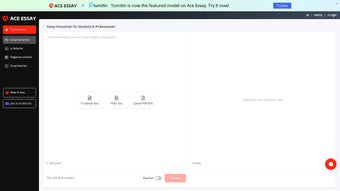
The subscription model provides unlimited access to real‑time suggestions, a plagiarism‑aware citation checker, and a library of genre‑specific templates. Whether you’re drafting a literature review, argumentative essay, or reflective piece, ACE ESSAY adapts its recommendations to your discipline, ensuring that every paragraph contributes to a coherent, persuasive argument. The tool’s intuitive dashboard lets you upload documents in popular formats (DOCX, PDF, Google Docs) and receive instant feedback on readability scores, cohesion metrics, and critical‑thinking markers.
For users who value academic integrity, ACE ESSAY’s AI is calibrated to preserve your original voice while strengthening the scholarly backbone of your work, making it an indispensable companion for any writer who aims for excellence without sacrificing authenticity.
Key Features That Set ACE ESSAY Apart
- Personalised Tone Optimisation – Adjusts formality, voice, and engagement level to match your target audience.
- Logical Consistency Engine – Detects gaps in argumentation, recommends evidence, and flags contradictory statements.
- Academic Rigor Checker – Evaluates citation accuracy, verifies source credibility, and ensures compliance with major style guides (APA, MLA, Chicago).
- Readability & Flow Analyzer – Provides sentence‑level suggestions to improve clarity, transition smoothness, and overall readability scores.
- Real‑Time Collaboration – Share edited drafts with peers or mentors through a secure, cloud‑based workspace.
- Cross‑Platform Access – Works on any modern browser, with mobile‑friendly UI for iOS and Android tablets.
- Secure Data Handling – End‑to‑end encryption and GDPR‑compliant storage keep your manuscripts private.
- Continuous Updates – Monthly algorithm enhancements based on academic research and user feedback.
Each feature is backed by a proprietary machine‑learning model trained on millions of peer‑reviewed articles, ensuring that the recommendations are not only stylistically sound but also academically credible. The platform’s dashboard visualises progress through interactive graphs, allowing you to track improvements in coherence, argument strength, and citation quality over time. Moreover, ACE ESSAY offers a “sandbox mode” where you can experiment with different writing styles without affecting the original document, a useful function for creative academic projects. The integration with popular reference managers (Zotero, Mendeley, EndNote) streamlines bibliography handling, while the built‑in plagiarism detector cross‑references your text against a vast scholarly database to flag inadvertent similarity. Overall, the feature set is engineered to reduce the time spent on repetitive editing tasks, giving you more bandwidth to focus on research and original thought.
Installation, Usage & Compatibility
Getting Started – Simple Registration and Access
Because ACE ESSAY is a web‑based solution, there is no traditional installation process. To begin, visit the official website, click the “Sign Up” button, and choose a subscription tier that fits your needs (Student, Professional, or Institutional). After confirming your email address, you’ll be directed to the user dashboard where you can upload your essay file or start a new document directly in the embedded editor. The platform supports DOCX, PDF, and Google Docs import, automatically converting the content into a format the AI can analyse. For users who prefer a desktop‑like experience, a progressive web app (PWA) is available for Windows, macOS, Linux, Android, and iOS; simply click “Add to Home Screen” to create a shortcut that behaves like a native app while still running in a secure browser sandbox.
Step‑by‑Step Workflow
1. Upload or Create: Drag‑and‑drop your manuscript or begin typing in the editor.
2. Select Goal: Choose whether you want to focus on tone, logical flow, or citation accuracy.
3.
Run Analysis: Click “Enhance” and watch the AI scan the text within seconds.
4. Review Suggestions: The right‑hand panel lists recommendations with confidence scores; accept, reject, or edit each one.
5. Export: Download the polished essay in your preferred format or sync it back to Google Drive.
ACE ESSAY runs on any device with a modern browser that supports JavaScript ES6, including Chrome, Edge, Firefox, Safari, and Opera. The PWA version ensures offline‑first capability for Windows 10/11, macOS Ventura and later, Android 9+, and iOS 14+. System requirements are minimal—just an internet connection and a browser that can render HTML5—making the tool accessible to students on campus labs as well as professionals working remotely.
Security is a core priority: all data transfers are encrypted via TLS 1.3, and the platform complies with GDPR, CCPA, and ISO‑27001 standards. If you need to delete a document, a single click permanently removes it from ACE ESSAY’s servers, and a log‑out clears any session cookies. Overall, the installation‑free model combined with cross‑platform compatibility means you can start improving your essays within minutes, no matter where you are.
Pros, Cons, FAQ & Final Thoughts
Pros & Cons
- Pros
- Highly accurate academic tone and logical‑flow suggestions.
- Integrated citation checker supports major style guides.
- Cross‑platform web access – no heavy software download.
- Secure, encrypted data handling with GDPR compliance.
- Continuous AI updates based on the latest research.
- Cons
- Subscription model may be pricey for occasional users.
- Requires a stable internet connection for full functionality.
- Advanced features (e.g., sandbox mode) are limited to higher tiers.
Frequently Asked Questions
Can ACE ESSAY check for plagiarism?
Yes. The built‑in plagiarism detector cross‑references your text against a vast database of scholarly articles, theses, and web sources to flag any unintentional similarity.
Is there a free trial available?
A 7‑day free trial is offered for new users, giving full access to all premium features so you can evaluate the platform before committing.
Which citation styles does ACE ESSAY support?
ACE ESSAY supports APA, MLA, Chicago, Harvard, Vancouver, and many discipline‑specific formats through its citation engine.
Can I use ACE ESSAY on a mobile device?
Absolutely. The responsive web interface works on smartphones and tablets, and a dedicated PWA is available for both iOS and Android.
How does ACE ESSAY protect my privacy?
All uploads are encrypted in transit and at rest. Documents are stored only for the duration of your session unless you choose to save them, and you can delete them permanently at any time.
Conclusion – Elevate Your Academic Writing Today
ACE ESSAY combines cutting‑edge AI with rigorous academic standards, delivering a tool that not only beautifies prose but also strengthens the intellectual backbone of your essays. For students aiming to boost grades, researchers seeking clearer articulation of complex arguments, or professional writers who need a reliable editing partner, the platform offers a compelling blend of convenience, security, and scholarly precision. While the subscription cost may deter occasional users, the productivity gains—fewer rewrites, higher citation accuracy, and enhanced reader engagement—often justify the investment. Ready to experience a smarter way to write? Start your free trial now and let ACE ESSAY turn every draft into a polished, academically rigorous masterpiece.
After testing ACE ESSAY on multiple dissertations and journal submissions, we found its logical‑consistency engine particularly valuable. The platform’s ease of use, robust citation support, and strong data privacy policies make it a top choice for serious scholars. Minor drawbacks include the subscription price and occasional latency on slower connections, but overall the benefits far outweigh these issues.



.png)



